Boost the Performance of AMD Ryzen 9000 Series: MSI PBO Enhanced Mode, Set Thermal Point, and High-Efficiency Mode
Motherboards
AMD has just released the flagship Ryzen 9 9950X and Ryzen 9 9900X processors in their Ryzen 9000 series, delivering top-notch performance. To help you get even more out of these processors, MSI has introduced several features designed to optimize performance, such as PBO Enhanced Mode, Set Thermal Point, and High-Efficiency Mode.
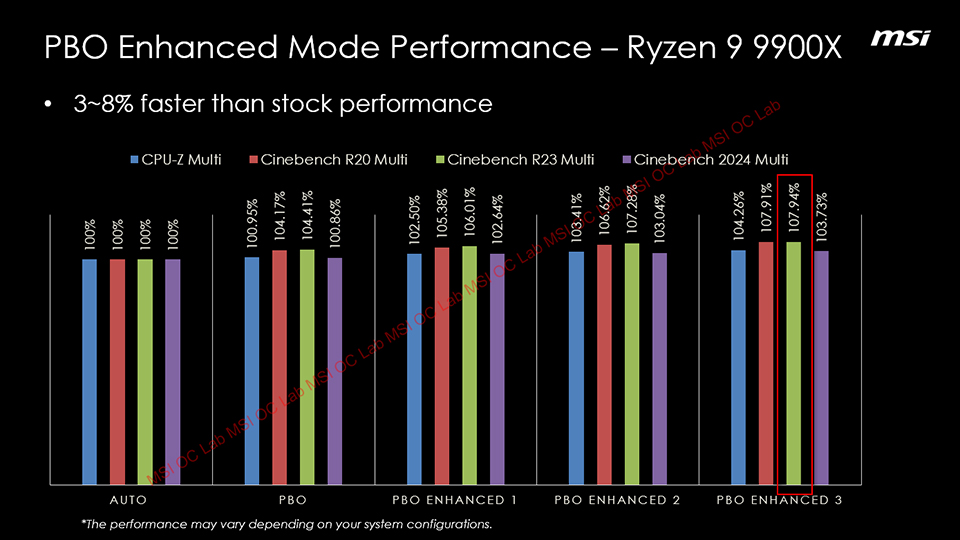
PBO Enhanced Mode – Boost Your Ryzen 9000 Performance by Up to 15%
PBO Enhanced Mode builds on AMD’s Precision Boost Overdrive (PBO) by further optimizing the processor for better performance.
For example, enabling PBO on a Ryzen 9 9950X can increase Cinebench R23 performance by about 5%, while MSI's PBO Enhanced Mode can push this to a 10% increase. For the Ryzen 7 9700X, the gain can be as much as 15% compared to the default settings.



Set Thermal Point – Lower Temperatures without Sacrificing Performance
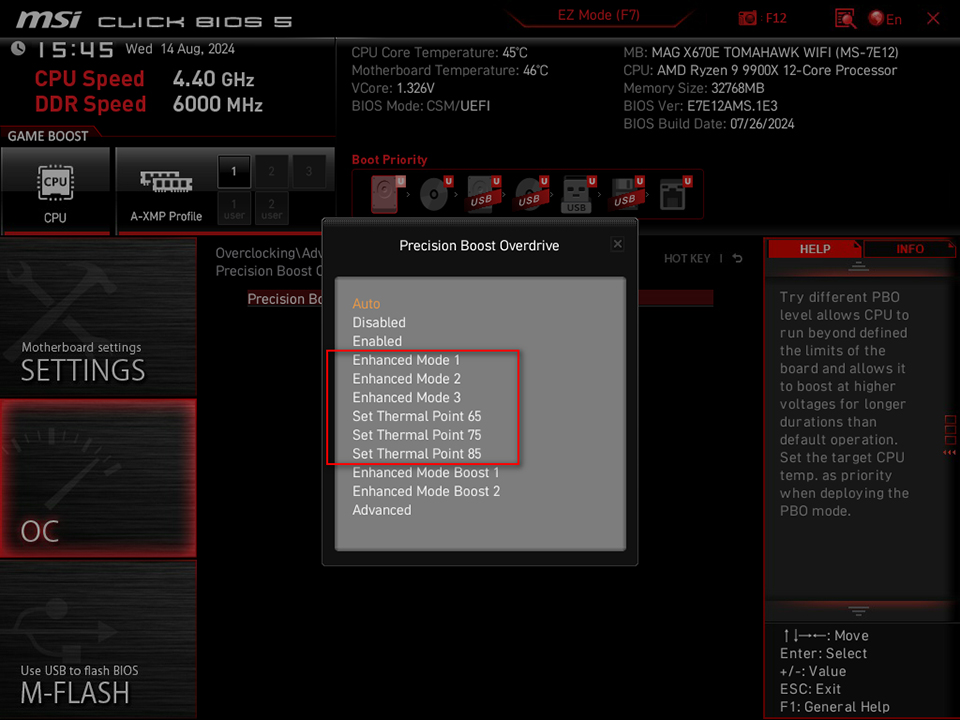
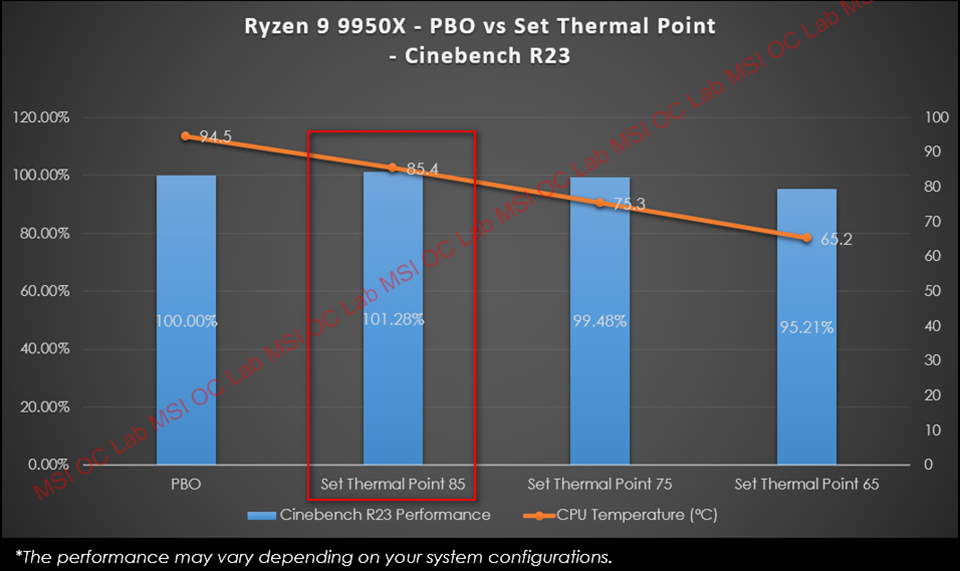
Like the Ryzen 9 7950X, the new Ryzen 9 9950X can reach temperatures of 95°C under full load. MSI Set Thermal Point feature offers three temperature limit settings: 85°C, 75°C, and 65°C. This allows users to lower the CPU temperature without significantly impacting performance.
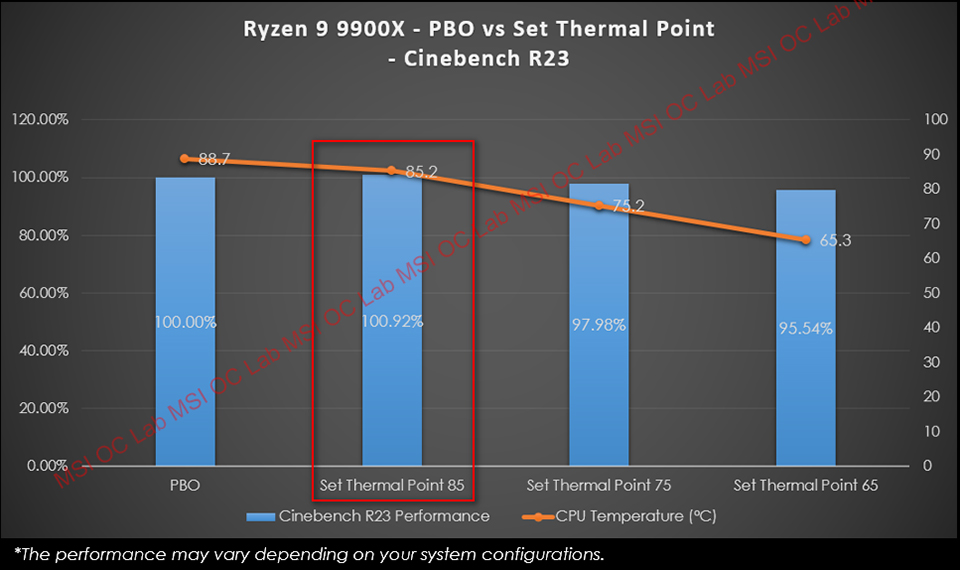
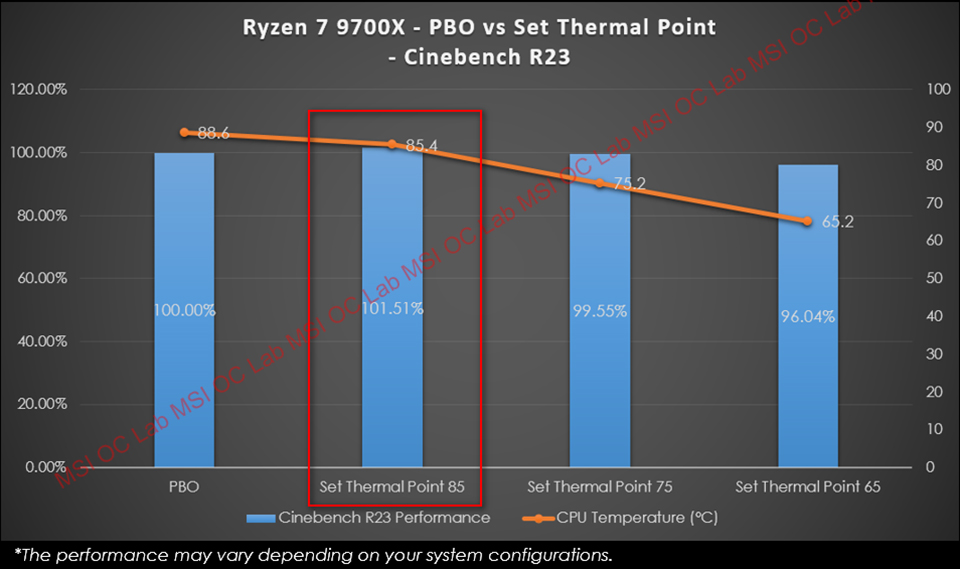
For instance, with the Ryzen 9 9950X, activating Set Thermal Point 85 limits the temperature to 85°C, and thanks to MSI’s optimization, performance doesn’t decrease—it might even improve slightly. This feature can also lower the temperature of other Ryzen 9000 processors by 3-4°C without sacrificing performance.

High-Efficiency Mode – Optimized Memory Settings for Lower Latency
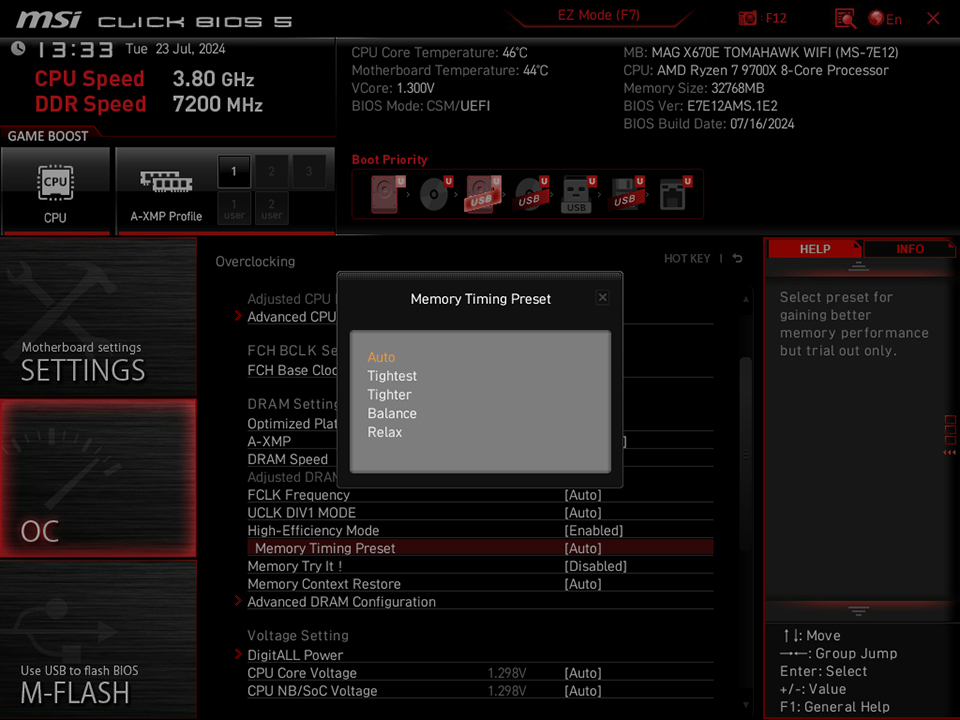
MSI’s High-Efficiency Mode fine-tunes memory settings to reduce latency and boost performance in some games. This mode supports four presets: Tightest, Tighter, Balance, and Relax, allowing users to choose the best configuration based on their memory's overclocking capability.
High-Efficiency Mode can also be used with AMD's Optimized Performance Profile (OPP) and MSI Memory Try It! features to further enhance overall and gaming performance.
For more details on AMD OPP, MSI Memory Try It!, and High-Efficiency Mode, check out this article.
System Configurations:
Processor: AMD Ryzen 9000 Series
Motherboard: MSI MAG X670E TOMAHAWK WIFI
Memory: Kingston FURY Beast DDR5-6000 16GB x2
Graphics Card: MSI GeForce RTX 4080 16GB SUPRIM X
CPU Cooler: MSI MAG CORELIQUID I360
Power Supply: MSI MEG Ai1000P PCIE5
Operating System: Microsoft Windows 11 Pro 23H2
* The performance may vary based on system configurations.
Processor: AMD Ryzen 9000 Series
Motherboard: MSI MAG X670E TOMAHAWK WIFI
Memory: Kingston FURY Beast DDR5-6000 16GB x2
Graphics Card: MSI GeForce RTX 4080 16GB SUPRIM X
CPU Cooler: MSI MAG CORELIQUID I360
Power Supply: MSI MEG Ai1000P PCIE5
Operating System: Microsoft Windows 11 Pro 23H2
* The performance may vary based on system configurations.
MSI X670/B650/A620 motherboard: https://www.msi.com/Landing/amd-am5-x670-b650-motherboard
MSI CPU liquid cooling solution: https://www.msi.com/Liquid-Cooling
MSI power supply units: https://www.msi.com/Power-Supply
MSI CPU liquid cooling solution: https://www.msi.com/Liquid-Cooling
MSI power supply units: https://www.msi.com/Power-Supply